Hours to Decimal Calculator
Use our free hours to decimal calculator to convert hours and minutes into payroll-ready decimal hours instantly. Ideal for ADP, QuickBooks, Gusto timesheets, contractor billing, and Excel spreadsheets.
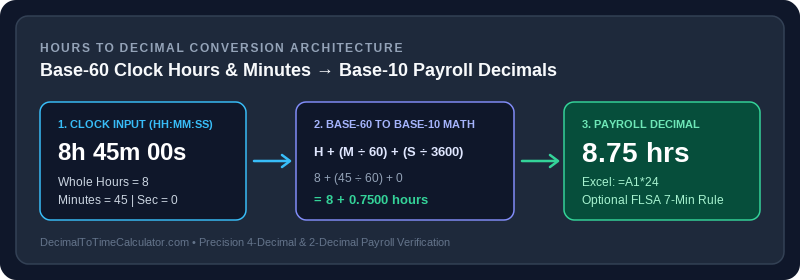
Hours + (Minutes ÷ 60) + (Seconds ÷ 3600). Example: 8 hours 45 minutes = 8.75 decimal hours.
No rounding applied. Exact mathematical conversion.
08:45:00
Based on 8.75 decimal hours @ $25.00/hr (Regular pay: $218.75, Overtime: $0.00).
Hours to Decimal Step-by-Step Math
- Take the whole number as hours: 8 hour(s).
- Multiply decimal remainder by 60 for minutes: 0.75 × 60 = 45 minute(s).
- Remaining fraction of minutes multiplied by 60: 0 second(s).
Automate Timesheet Math & Overtime
Modern time-tracking tools round punch times per FLSA rules and sync timesheets directly into payroll without manual conversion.
All-in-one payroll with automated timesheet sync & FLSA overtime tracking.
Mobile GPS time tracking and seamless integration with QuickBooks accounting.
Easy employee scheduling, time clock tablet app, and automated break tracking.
Disclosure: We independently review payroll software. Referral links may earn an affiliate commission to help fund our free calculation tools.
How to Convert Hours and Minutes to Decimal Hours
Every digital spreadsheet and payroll engine calculates gross pay by multiplying hourly wages by a single decimal number rather than clock notation. Whether you need to convert hours to decimal entries at the end of a pay period or audit an invoice before submitting it to a client, converting minutes by dividing by 60 prevents systematic underpayments and rounding discrepancies.
Typing 8.45 into a payroll spreadsheet instead of 8.75 is one of the highest-frequency administrative mistakes in small business accounting. Because an hour has 60 minutes—not 100—every 15 clock minutes adds 0.25 decimal hours. Running punch-card totals through an hours to decimal calculator removes mental arithmetic errors before payroll runs close.
Why Precision Matters for Time Card Conversion & Calculating Hours Worked
Across logistics, healthcare, field maintenance, legal consulting, and software contracting, teams rely on accurate time card conversion to calculate hours worked without per-shift rounding drift. Consider a technician earning $32.00 per hour who works 8 hours and 45 minutes across 20 workdays in a month: entering 8.45 instead of the true decimal 8.75 drops 0.30 hours per day—shortchanging earnings by $192.00 per month or more than $2,300 per year for a single worker. For multi-day punch sheets, pair this converter with our Time Card Calculator in Decimals or Weekly Timesheet Calculator.
7h 45m → 7 + (45 ÷ 60) = 7.75 hours
2h 15m 36s → 2 + 0.25 + 0.01 = 2.26 hours
525 total mins ÷ 60 = 8.75 hours
Common Hours to Decimal Reference Chart
The table below benchmarks frequently logged workday durations across exact 4-decimal math, standard 2-decimal payroll reporting, 6-minute tenth-hour increments, and gross wages at a baseline $20/hr rate:
| Clock Time (H:M) | Exact Decimal | Payroll (2-Dec) | 6-Min Tenth | Pay @ $20/hr |
|---|---|---|---|---|
| 0:15 (15m) | 0.2500 | 0.25 hrs | 0.3 hrs | $5.00 |
| 0:30 (30m) | 0.5000 | 0.50 hrs | 0.5 hrs | $10.00 |
| 0:45 (45m) | 0.7500 | 0.75 hrs | 0.8 hrs | $15.00 |
| 4:20 (4h 20m) | 4.3333 | 4.33 hrs | 4.3 hrs | $86.60 |
| 7:15 (7h 15m) | 7.2500 | 7.25 hrs | 7.3 hrs | $145.00 |
| 7:30 (7h 30m) | 7.5000 | 7.50 hrs | 7.5 hrs | $150.00 |
| 7:45 (7h 45m) | 7.7500 | 7.75 hrs | 7.8 hrs | $155.00 |
| 8:15 (8h 15m) | 8.2500 | 8.25 hrs | 8.3 hrs | $165.00 |
| 8:30 (8h 30m) | 8.5000 | 8.50 hrs | 8.5 hrs | $170.00 |
| 8:45 (8h 45m) | 8.7500 | 8.75 hrs | 8.8 hrs | $175.00 |
| 9:20 (9h 20m) | 9.3333 | 9.33 hrs | 9.3 hrs | $186.60 |
| 10:45 (10h 45m) | 10.7500 | 10.75 hrs | 10.8 hrs | $215.00 |
How to Convert Hours to Decimal in Excel & Google Sheets
If your organization exports shift logs from a digital time clock into Microsoft Excel or Google Sheets, apply one of the three spreadsheet formulas below depending on how your source column stores clock values:
| Spreadsheet Scenario | Excel / Sheets Formula | Output Format |
|---|---|---|
Formatted Time Cell (08:45:00 in A2) | =A2*24 | Number (2 decimals → 8.75) |
| Extract H/M/S Components | =HOUR(A2)+MINUTE(A2)/60+SECOND(A2)/3600 | Number (2 or 4 decimals) |
Duration Exceeding 24 Hours (e.g. 42:30) | =VALUE(A2)*24 | Number (e.g. 42.50 weekly hrs) |
| Quarter-Hour FLSA Payroll Rounding | =MROUND(A2*24, 0.25) | Rounds to nearest 0.25 hr |
Minute-by-Minute Decimal Reference Table (1 to 60 Minutes)
Full 60-row chart converting individual minutes into exact 4-decimal hours, 2-decimal payroll hours, and FLSA 7-minute brackets.
| Minutes (m) | Exact Decimal (hr) | Standard Payroll (hr) | FLSA 15-Min (hr) | 6-Min Tenth (hr) |
|---|---|---|---|---|
| 1 | 0.0167 | 0.02 | 0.00 | 0.0 |
| 2 | 0.0333 | 0.03 | 0.00 | 0.0 |
| 3 | 0.0500 | 0.05 | 0.00 | 0.1 |
| 4 | 0.0667 | 0.07 | 0.00 | 0.1 |
| 5 | 0.0833 | 0.08 | 0.00 | 0.1 |
| 6 | 0.1000 | 0.10 | 0.00 | 0.1 |
| 7 | 0.1167 | 0.12 | 0.00 | 0.1 |
| 8 | 0.1333 | 0.13 | 0.25 | 0.1 |
| 9 | 0.1500 | 0.15 | 0.25 | 0.2 |
| 10 | 0.1667 | 0.17 | 0.25 | 0.2 |
| 11 | 0.1833 | 0.18 | 0.25 | 0.2 |
| 12 | 0.2000 | 0.20 | 0.25 | 0.2 |
| 13 | 0.2167 | 0.22 | 0.25 | 0.2 |
| 14 | 0.2333 | 0.23 | 0.25 | 0.2 |
| 15 | 0.2500 | 0.25 | 0.25 | 0.3 |
| 16 | 0.2667 | 0.27 | 0.25 | 0.3 |
| 17 | 0.2833 | 0.28 | 0.25 | 0.3 |
| 18 | 0.3000 | 0.30 | 0.25 | 0.3 |
| 19 | 0.3167 | 0.32 | 0.25 | 0.3 |
| 20 | 0.3333 | 0.33 | 0.25 | 0.3 |
| 21 | 0.3500 | 0.35 | 0.25 | 0.4 |
| 22 | 0.3667 | 0.37 | 0.25 | 0.4 |
| 23 | 0.3833 | 0.38 | 0.50 | 0.4 |
| 24 | 0.4000 | 0.40 | 0.50 | 0.4 |
| 25 | 0.4167 | 0.42 | 0.50 | 0.4 |
| 26 | 0.4333 | 0.43 | 0.50 | 0.4 |
| 27 | 0.4500 | 0.45 | 0.50 | 0.5 |
| 28 | 0.4667 | 0.47 | 0.50 | 0.5 |
| 29 | 0.4833 | 0.48 | 0.50 | 0.5 |
| 30 | 0.5000 | 0.50 | 0.50 | 0.5 |
| 31 | 0.5167 | 0.52 | 0.50 | 0.5 |
| 32 | 0.5333 | 0.53 | 0.50 | 0.5 |
| 33 | 0.5500 | 0.55 | 0.50 | 0.6 |
| 34 | 0.5667 | 0.57 | 0.50 | 0.6 |
| 35 | 0.5833 | 0.58 | 0.50 | 0.6 |
| 36 | 0.6000 | 0.60 | 0.50 | 0.6 |
| 37 | 0.6167 | 0.62 | 0.50 | 0.6 |
| 38 | 0.6333 | 0.63 | 0.75 | 0.6 |
| 39 | 0.6500 | 0.65 | 0.75 | 0.7 |
| 40 | 0.6667 | 0.67 | 0.75 | 0.7 |
| 41 | 0.6833 | 0.68 | 0.75 | 0.7 |
| 42 | 0.7000 | 0.70 | 0.75 | 0.7 |
| 43 | 0.7167 | 0.72 | 0.75 | 0.7 |
| 44 | 0.7333 | 0.73 | 0.75 | 0.7 |
| 45 | 0.7500 | 0.75 | 0.75 | 0.8 |
| 46 | 0.7667 | 0.77 | 0.75 | 0.8 |
| 47 | 0.7833 | 0.78 | 0.75 | 0.8 |
| 48 | 0.8000 | 0.80 | 0.75 | 0.8 |
| 49 | 0.8167 | 0.82 | 0.75 | 0.8 |
| 50 | 0.8333 | 0.83 | 0.75 | 0.8 |
| 51 | 0.8500 | 0.85 | 0.75 | 0.9 |
| 52 | 0.8667 | 0.87 | 0.75 | 0.9 |
| 53 | 0.8833 | 0.88 | 1.00 | 0.9 |
| 54 | 0.9000 | 0.90 | 1.00 | 0.9 |
| 55 | 0.9167 | 0.92 | 1.00 | 0.9 |
| 56 | 0.9333 | 0.93 | 1.00 | 0.9 |
| 57 | 0.9500 | 0.95 | 1.00 | 1.0 |
| 58 | 0.9667 | 0.97 | 1.00 | 1.0 |
| 59 | 0.9833 | 0.98 | 1.00 | 1.0 |
| 60 | 1.0000 | 1.00 | 1.00 | 1.0 |
Hours to Decimal Calculator FAQ
Clear answers on converting hours and minutes to decimal format, Excel formulas, and FLSA payroll rounding.
How does an hours to decimal calculator work?
An hours to decimal calculator converts base-60 clock time into base-10 numbers using the formula Decimal Hours = Hours + (Minutes ÷ 60) + (Seconds ÷ 3,600). For instance, 8 hours and 45 minutes becomes 8 + (45 ÷ 60) = 8.75 decimal hours.
How do I convert hours and minutes to decimal manually?
Keep the hours unchanged and divide only the minutes by 60. For example, to convert 7 hours and 15 minutes, calculate 15 ÷ 60 = 0.25, then add 7 to get 7.25 decimal hours. Never write 7 hours 15 minutes as 7.15 on payroll timesheets.
How do I convert hours to decimal in Excel or Google Sheets?
If cell A2 holds a formatted Excel time value such as 08:45, enter =A2*24 and format the output cell as Number with two decimals to display 8.75. If hours and minutes are stored in text or separate cells, use =HOUR(A2)+(MINUTE(A2)/60)+(SECOND(A2)/3600).
What is 8 hours and 30 minutes as a decimal?
8 hours and 30 minutes equals exactly 8.50 decimal hours because 30 divided by 60 equals 0.50. Multiplying 8.50 hours by an hourly rate of $24 yields $204.00, whereas typing 8.30 by mistake would pay only $199.20.
What are the most common payroll rounding fractions in decimal hours?
Employers using quarter-hour intervals under U.S. DOL 29 CFR § 785.48(b) guidance convert 15 minutes to 0.25, 30 minutes to 0.50, 45 minutes to 0.75, and 60 minutes to 1.00. Employers using 6-minute tenth-hour intervals convert every 6 minutes into 0.10 decimal hours.
What is 7 hours and 20 minutes in decimal hours?
7 hours and 20 minutes equals 7.3333 decimal hours (typically rounded to 7.33 for invoicing or 7.25 / 7.50 under quarter-hour timesheet rounding depending on employer policy).